
Run your Hermes agent from your phone.
HAM is a native Android app — Kotlin and Material 3 — for the Hermes agent you already run, self-hosted or on Hermes Cloud. Live token streaming, turn-complete notifications, two voice modes, and a three-pane workspace that unfolds on your Fold or tablet.
Sign in with Nous and connect to a Hermes Cloud instance, or point it at your own server over LAN, VPN, or an HTTPS reverse proxy. Free and open source (MIT) — built entirely on the official Hermes interfaces, with no server changes, forks, or plugins required.
Independent, unofficial project. HAM is a third-party, open-source community app. It is not affiliated with, endorsed by, or an official product of Nous Research. “Hermes” and “Nous” are used only to describe the interfaces HAM connects to.

A phone-native window into the whole agent.
Everything HAM shows comes straight from your server's live and stored metadata — observed, never taken over.
Live streaming
Watch turns stream token-by-token over a direct WebSocket, with tool activity, code blocks, and reasoning rendered inline as they happen.
Push notifications
Fire off a task and lock your phone — HAM notifies you the moment a turn finishes or the agent needs you, with the reply and an Open session tap that drops you right back in. Long agent runs no longer need you watching the screen.
Two voice modes
App-owned dictation into the composer with a stop control, plus screen-off, hands-free voice conversation with playback and barge-in over a foreground mic service.
Approvals & prompts
Respond to tool approvals, clarify questions, and secret prompts from the phone. Parked requests return correctly after a reconnect.
Sessions & projects
Browse stored sessions, switch between them, and organize by project — with durable stored IDs kept cleanly separate from live runtime sessions.
Artifacts & host files
Open artifacts and browse host files the agent produced, with images and documents rendered natively.
Share into Hermes
Share images, PDFs, and text from any Android app straight into a session — staged in the composer for review, never auto-sent.
Adaptive & foldable-first
One app that responds to the window in front of you: compact phone UI, medium layouts, and an expanded three-pane workspace for unfolded folds and tablets — no device-name hacks.
Operational controls
Manage cron jobs, inspect background processes, and drive session and runtime controls with observer and controller roles kept explicit.
Private by design
Credentials and trust are scoped per server origin and stored with Android Keystore-backed encryption. WebSocket tickets are single-use, in-memory values. No telemetry.
Free & open source
The entire app is MIT-licensed on GitHub — audit every line, build it yourself, or contribute. No paywall, no telemetry, no lock-in; you own your data and your server.
Captured on a real device.
Real captures from a live session on device — no mockups, no staged data.
Home & Sessions
Stored sessions and quick compose, organized by project.
Chat
Live session with tool timeline, code & markdown, reasoning.
Projects
Group sessions by project and switch between them.
Settings
Server connection, model, reasoning effort, and voice.
It taps you on the shoulder.
HAM posts a system notification the instant a turn completes or the agent needs a decision — the reply is right there, and Open session takes you straight back to the conversation. Kick off a long run, lock the phone, and get on with your day.


One screen. The whole workspace.
Unfold HAM or open it on a tablet and the layout earns the space: project navigation on the left, sessions in the middle, and the live agent workspace on the right. Browse, switch, and work without losing the conversation.
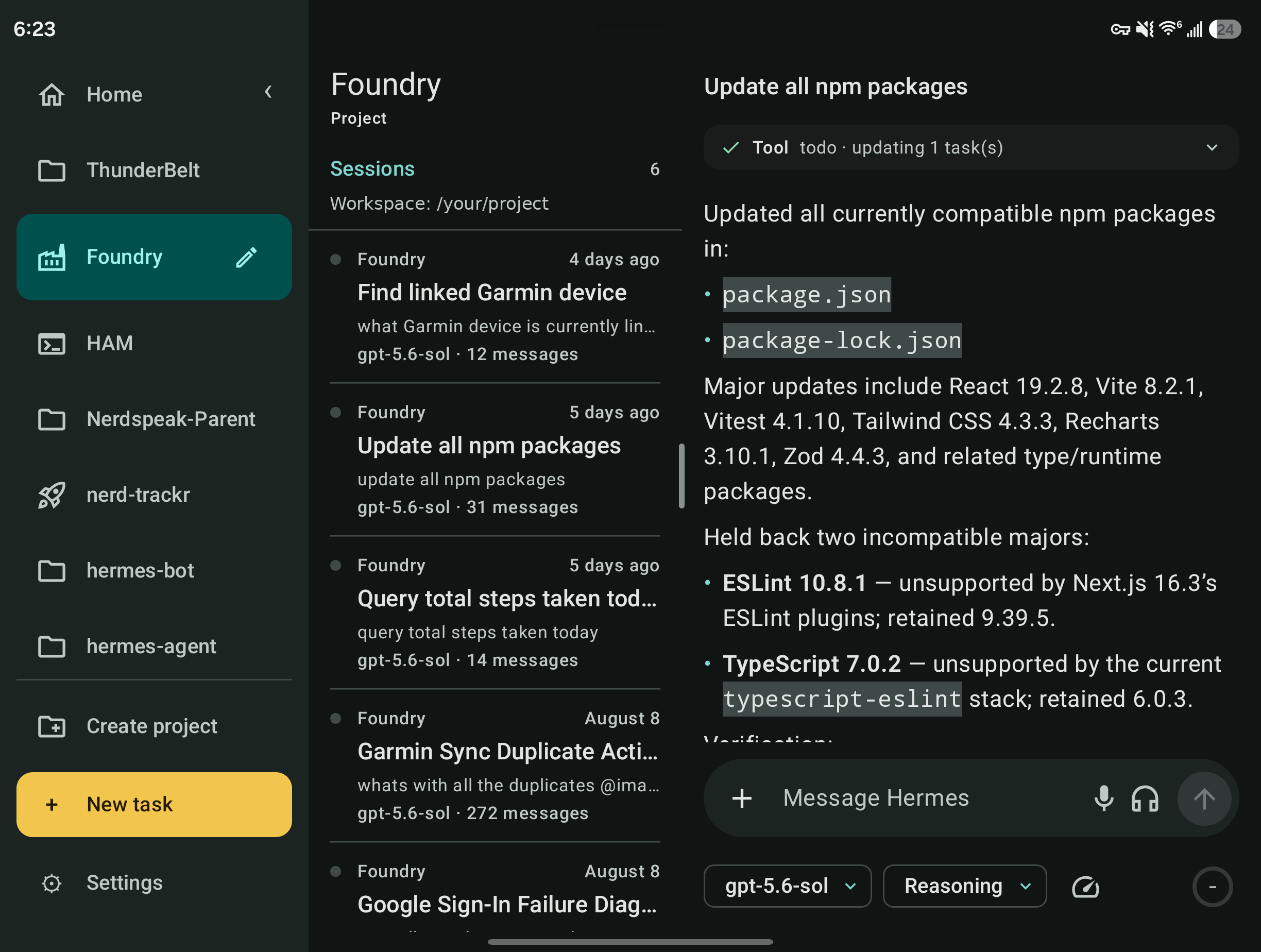
Within those, in context: voice dictation & conversation, tool/clarify/secret prompts, artifacts & host files, cron jobs, and background processes.
Two ways to connect.
Either sign in to a managed Hermes Cloud instance, or point HAM at your own self-hosted server. Both authenticate the same way — Sign in with Nous.
Option A — Hermes Cloud preview
Deploy an always-on agent from the Nous Portal — no server, no DevOps. Then in HAM: enter your Cloud instance's origin on the Connect screen and tap Sign in with Nous. That's it; the endpoints are already live, so there's no dashboard to install.
Option B — Self-hosted: paste one prompt
Running your own Hermes on a VPS or homelab box? HAM connects to its web dashboard (the /api/* and WebSocket surface on port 9119), which most installs don't run by default. Copy the prompt below into your running agent (CLI, Telegram, or Discord) and it does the server-side setup, then hands you the connection details.
Copy
Tap copy to put the setup prompt on your clipboard.
Paste into Hermes
Paste it into your agent. It installs the dashboard extra, wires up Nous Portal auth, and binds the dashboard to a reachable address.
Connect in HAM
Your agent replies with the origin to enter on HAM's Connect screen. Tap sign in and approve it in the Nous Portal.
Set up the Hermes web dashboard so I can connect the HAM Android app. Follow these steps and don't invent any values — ask me if you need a decision.

1. Install the dashboard extra if it isn't already: from the hermes-agent directory, run `uv pip install -e ".[web]"`.
2. Wire up Nous Portal authentication for the dashboard (`hermes setup --portal`). HAM signs in through the Nous Portal, so the dashboard must advertise the native_pkce auth flow — a username/password/basic setup will NOT work.
3. Start the dashboard bound to an address my phone can reach, on port 9119: `hermes dashboard --host 0.0.0.0 --port 9119 --no-open`. Keep it running across reboots (systemd or tmux).
4. Tell me the best origin to reach it from my phone — my LAN IP, a VPN address (Tailscale etc.), or a reverse-proxy domain over HTTPS.
5. Verify GET /api/status shows auth_required: true and "native_pkce" in auth_flows. If it doesn't, fix it before finishing.

Then reply with ONLY:
Origin (e.g. http://192.168.x.x:9119 or https://your-domain):
native_pkce present (yes/no):
Already run hermes dashboard with Nous Portal auth for the desktop app? Then you're set — just make sure it's bound to an address your phone can reach (not 127.0.0.1) and go straight to HAM's Connect screen.
Questions, answered.
What's Hermes?
Hermes is Nous Research's open agent framework — an AI agent with terminal, browser, file, and scheduling tools that runs on your own machine or in Hermes Cloud. HAM is a phone-native window into that agent.
Is HAM an official Nous product?
No. HAM is an independent, third-party open-source app built by the community against Hermes' public interfaces. It is not affiliated with, endorsed by, or maintained by Nous Research, and it is not an official Nous or Hermes product. The names “Hermes” and “Nous” refer only to the agent framework and sign-in HAM connects to.
How do I install the APK?
Download it, tap the file, and allow installs from your browser when Android asks. On first launch, enter your server origin and sign in with Nous. Verify the download first with apksigner verify --verbose if you like — releases are signed in CI.
Why these permissions?
Microphone — only while you're actively dictating or in a voice conversation you started. Notifications — turn-complete and needs-attention alerts. A foreground service keeps voice and long tasks alive with a visible, stoppable notification. That's it; there's no location, contacts, or ad SDK.
Where does my data go?
Straight between your phone and your Hermes server — nowhere else. No telemetry, no analytics, no third-party servers. Credentials are stored with Android Keystore-backed encryption, scoped per server. See the privacy policy.
Is it on the Play Store?
Not yet — the listing is in progress. Until then the signed APK on GitHub Releases is the official build. Note the sideload APK and a future Play install are signed differently and won't upgrade over each other.
Can I contribute?
Please do — the whole app is MIT-licensed. Issues, PRs, and feature ideas are welcome on GitHub. Kotlin, Jetpack Compose, Material 3, built against the official hermes serve interfaces.
Sideload the APK straight from GitHub.
A native Android APK you install directly — free and open source under the MIT license. Read every line, build it yourself, or contribute. The Play Store listing is in progress.
Releases are built and signed in CI. Verify the APK signature with apksigner verify before installing.